

WP Extended Pro 3.2.7
Original price was: $49.99.$9.99Current price is: $9.99.
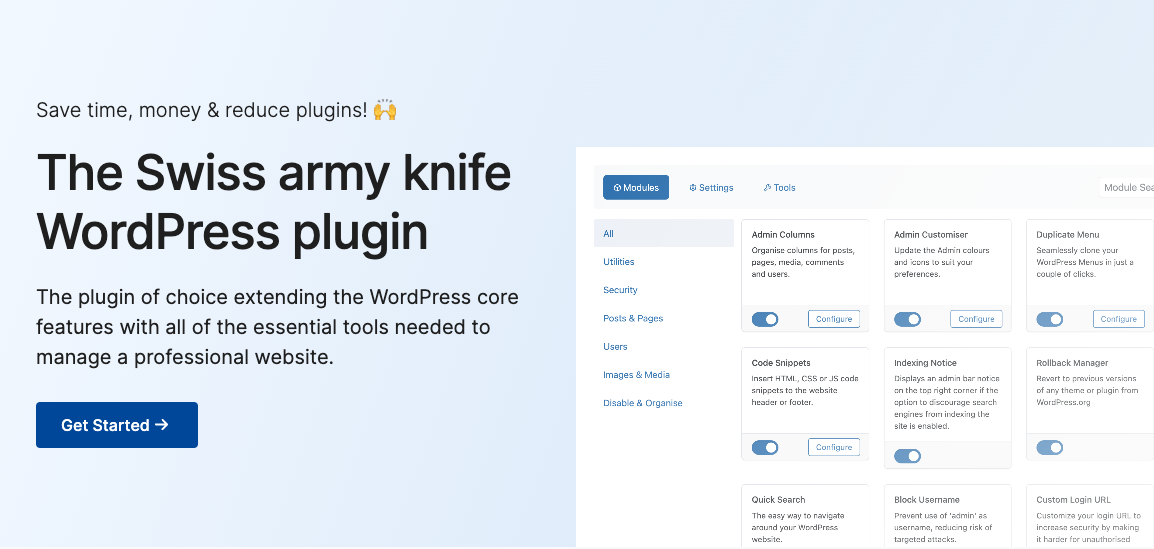
WP Extended Pro 3.2.7 is a comprehensive modular toolkit plugin designed to reduce “plugin sprawl” by consolidating over 40 single-purpose administrative utilities into a single, cohesive dashboard. Instead of installing dozens of separate plugins—which often slows down server performance and triggers code conflicts—developers and agencies use this tool to manage site security, custom code snippets, media assets, and WordPress admin settings from one location.
WP Extended Pro 3.2.7 Overview:
WP Extended Pro 3.2.7 is a comprehensive modular toolkit plugin designed to reduce “plugin sprawl” by consolidating over 40 single-purpose administrative utilities into a single, cohesive dashboard. Instead of installing dozens of separate plugins—which often slows down server performance and triggers code conflicts—developers and agencies use this tool to manage site security, custom code snippets, media assets, and WordPress admin settings from one location.
- Admin Customization: Rearrange, filter, and customize fields with Admin Columns, edit dashboard menus via Menu Editor Pro, hide persistent update notices, and completely brand or adjust login screens.
- Site Hardening & Security: Conceal your WordPress version number, block dangerous brute-force attempts like the standard “Admin” username, change default
/wp-adminURLs, and disable user enumeration or XML-RPC access. - Developer Workflow Tools: Write, execute, and organize custom HTML, PHP, or JavaScript with a dedicated Code Snippets engine featuring built-in security integrity hashing. It also includes global
404homepage redirection and safe plugin rollback managers. - Content & Media Controls: Enable native support for duplicating posts/pages directly in the Block Editor, manage custom post type ordering, swap media assets seamlessly without breaking live attachment links, and safely unlock SVG file uploads.
- Infrastructure Utilities: Configure stable external mail routing via the SMTP Email wizard (complete with delivery logging) and build customized landing pages using the upgraded native Maintenance Mode
WP Extended Pro 3.2.7 Detailed Specifications:
- Admin Columns
Organise columns for posts, pages, media, comments and users. - Admin Customiser
Update the Admin colours and icons to suit your preferences. - Quick Search
The easy way to navigate around your WordPress website. - Disk Usage Widget
Adds a widget to your WordPress dashboard display disk usage statistics. - Indexing Notice
An admin bar notice displaying an indexing status notice. - Duplicate Menu
Seamlessly clone your WordPress Menus in just a couple of clicks. - Code Snippets
Insert HTML, CSS or JS code snippets to the website header or footer. - Pixel Tag Manager
Easily manage the pixel tags for Google Analytics, Facebook and Pinterest. - Rollback Manager
Revert to previous versions of any theme or plugin from WordPress.org - SMTP Email
Reliably ensure the successful delivery of your emails with SMTP. - Hide Admin Notices
Hide unnecessary admin notices, allowing for a more focused and efficient admin experience. - Debug Mode
Enable Debug Mode to easily troubleshoot and resolve issues, providing detailed error logs and warnings for developers. - Limit Login Attempts
Prevent brute-force attacks by limiting the number of login attempts. - Block Usernames
Prevent use of certain usernames, reducing the risk of targeted attacks - Custom Login URL
Customize your login URL to increase security by making it harder for unauthorised access. - Hide WP version
Enhance security by hiding the WordPress version number from your site’s source view, thwarting targeted attacks. - Maintenance Mode
Switch your site to Maintenance Mode for updates or changes. - Disable XML-RPC
Increase security by disabling XML-RPC to prevent external applications from interfacing with your WordPress site, reducing vulnerability to attacks. - User Enumeration
Secures against hackers scanning for usernames, blocking user enumeration attempts. - User Last Login
Display the last login timestamps of users, monitoring user activity and managing user accounts effectively. - Disable Auto Updates
Gain full control over your site by manually managing updates, ensuring compatibility before applying new changes. - Clean Dashboard
Streamlines admin dashboard by hiding unwanted elements for a cleaner interface. - Disable Blog
Transform your site into a non-blogging platform by disabling blog-related features. - Disable Comments
Eliminate comment sections from your site, reducing spam and moderating efforts. - Hide Admin Bar
Keep the admin bar hidden for specific user roles or on specific pages. - Disable RSS Feeds
Ideal for websites that don’t require syndication or want to keep content exclusive to their platform. - Menu Editor
Customise your admin menus, including reordering, hiding, or renaming menu items. - Classic Editor
Switch back to the classic WordPress editor if preferred, offering a simpler content interface. - Gutenberg Widgets
Disable the Gutenberg widgets for those who prefer the classic WordPress interface.