
Blog
How does RCS work? The technology behind rich messaging

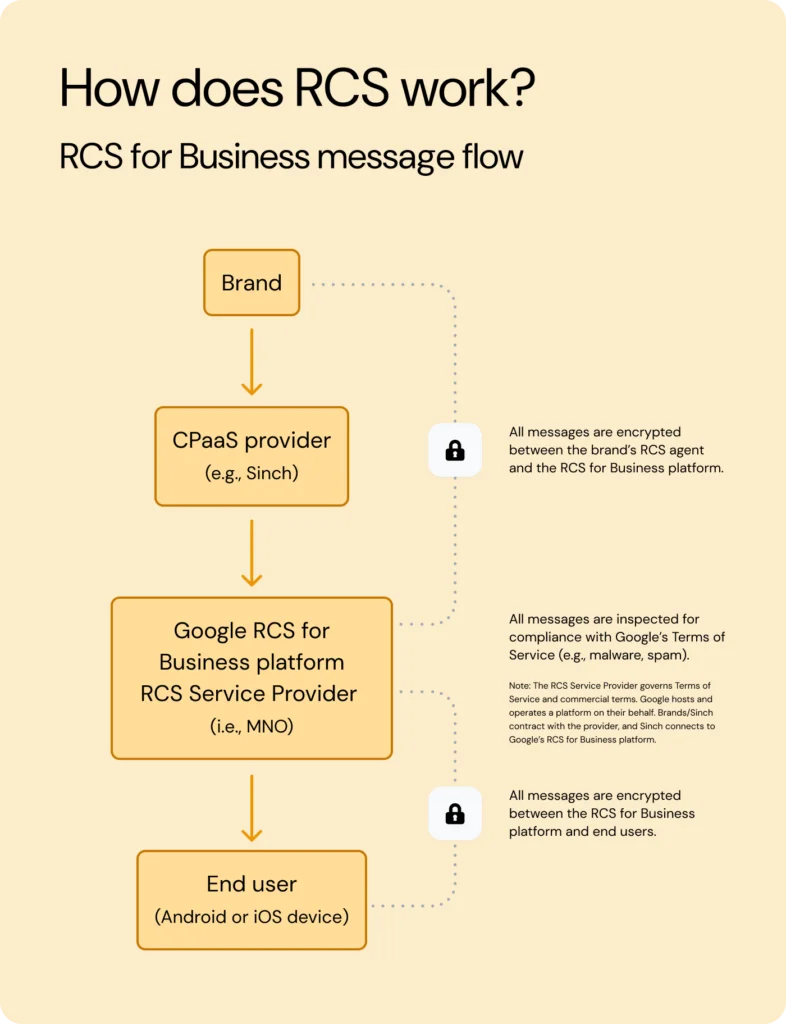
RCS works by sending messages over the internet – mobile data or Wi-Fi – instead of the cellular signaling channel that carries SMS. Your phone’s native messaging app connects to a Rich Communication Services (RCS) server operated by Google or your carrier, following a shared industry standard called the Universal Profile. That’s what makes read receipts, high-resolution media, and interactive buttons possible – and when the person on the other end can’t receive RCS, the message simply falls back to SMS.
That’s the short answer. But if you’re planning a messaging program, you probably have follow-up questions: Who runs the infrastructure? What does Google’s Jibe platform do? And what really happens when you message an iPhone?
In this guide, we’ll walk through how RCS moves from sender to recipient: the transport layer, the Universal Profile standard, message routing and fallback, device and carrier requirements, encryption, and how RCS for Business rides on top of it all.
What is RCS, and how is it different from SMS?
RCS is the messaging standard built to succeed SMS and MMS in the native inbox – same app your customers already text in, but with app-like features layered on. The core difference is how the message travels.
- SMS rides the cellular signaling network. Texts are squeezed into the spare capacity of the control channel that phones use to talk to cell towers – which is why SMS works on virtually any handset, but also why it’s capped at 160 characters of plain text.
- RCS rides the internet. Messages travel as data over mobile internet or Wi-Fi to an RCS server, the same general approach used by messaging apps – except RCS lives in the phone’s default messaging app, with no download required.
Think of SMS as a postcard: tiny, standardized, and deliverable almost anywhere. RCS is more like a courier service running on modern roads – it carries much more (10 MB+ images, video, carousels, branded sender profiles), confirms delivery and reading, and supports a genuine two-way conversation.
One thing RCS is not: a replacement for SMS everywhere. SMS remains the most universally compatible messaging channel in the world, and it’s the standard fallback when RCS isn’t available – the two are complementary, not competing. For a feature-by-feature breakdown, see our RCS vs. SMS comparison.
Who runs RCS? The Universal Profile, Google Jibe, and carriers
Here’s the attribution question that trips up half the internet: RCS is not a Google protocol. It’s an open standard from the GSM Association (GSMA) – the same industry body behind much of how mobile networks interoperate – and it has been in development since 2007.
Google is the standard’s biggest implementer. Three pieces make the ecosystem work:
- The Universal Profile (UP) is the GSMA’s shared rulebook – a specification that defines how every RCS client and server should behave so that messages work the same way across carriers, countries, and devices. Apple’s iPhone implementation launched on Universal Profile 2.4; Universal Profile 3.0, published in March 2025, adds end-to-end encryption to the standard itself (more on that below).
- Google Jibe is the infrastructure most RCS traffic actually runs on. Google acquired Jibe Mobile in 2015 and now operates RCS backends on behalf of many carriers worldwide, alongside building Google Messages, the default RCS app on Android. That’s why Google features so heavily in any explanation of RCS – it runs much of the plumbing, but the standard belongs to the mobile industry.
- Mobile carriers enable RCS on their networks (often by delegating to Jibe), handle interconnection, and play a role in verifying business senders. Now that Apple supports RCS, carriers also control when the feature is switched on for iPhone users on their network.
The result? A channel with the reach of a carrier technology and the feature set of a modern messaging app: RCS now counts around 1.5 billion users globally, including 250 million in the U.S., where over 1 billion RCS messages are sent every day.
How does RCS work when you send a message?
Whether it’s a friend’s group chat or a brand’s order update, an RCS message follows the same basic journey. Here’s the business version, since that’s where the most moving parts are:
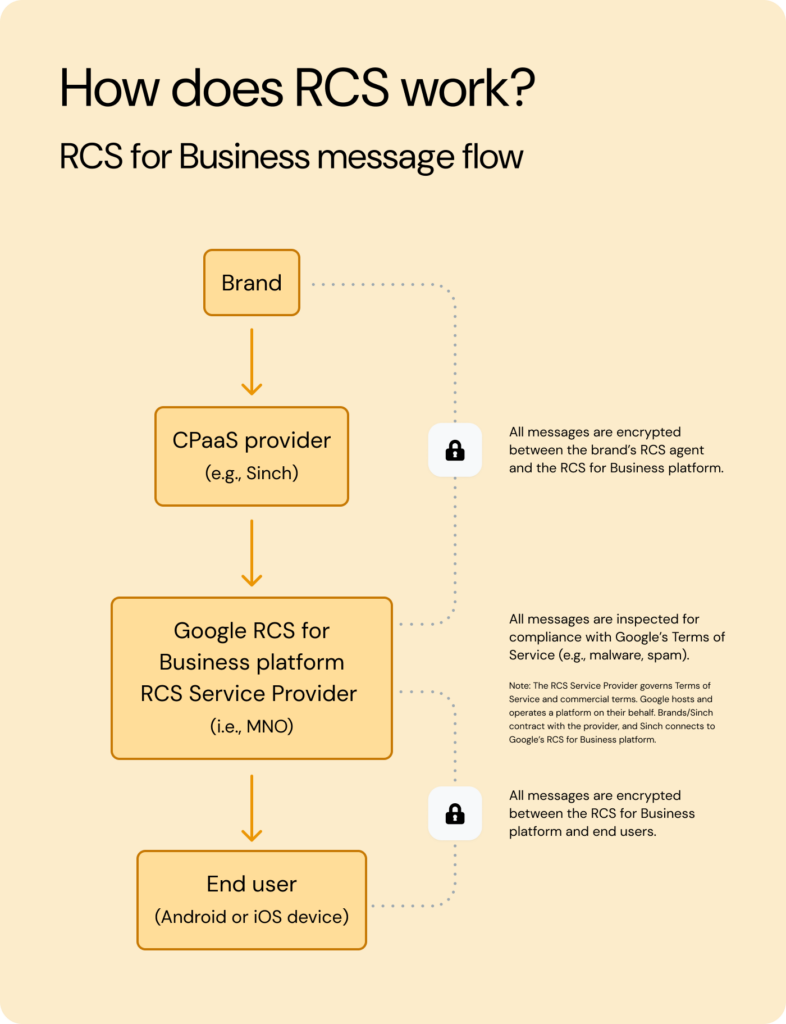
- The sender initiates the message. A business sends a message – a promotion, a delivery alert, or a one-time password (OTP) – through a messaging provider like Sinch.
- A capability check runs first. Before anything is sent, the platform checks whether the recipient’s device and carrier support RCS right now. This real-time check is what makes the channel reliable: no guessing, no messages lost to unsupported handsets.
- The message is routed over IP. If the device is RCS-capable, the message travels to Google’s RCS infrastructure (or, in some cases, directly to a carrier’s RCS platform), where it’s checked for spam, malware, and policy compliance, then pushed over mobile data or Wi-Fi to the recipient’s messaging app.
- Fallback catches everything else. If the capability check fails – older device, unsupported carrier, RCS switched off, no data connection – the message is delivered as SMS or MMS instead, so it still arrives.
That fallback step matters more than it sounds. EasyPark Group, a leader in digital parking, sends RCS where devices support it and falls back to SMS everywhere else – and keeps delivery rates above 97% in Germany. Rich where possible, reliable everywhere.
What do you need for RCS to work?
Four ingredients have to line up for a message to arrive as RCS rather than falling back:
- A compatible device and OS: An Android phone with Google Messages, or an iPhone running iOS 18 or later. Feature phones and older devices can’t receive RCS.
- Carrier or Google support: The recipient’s network must have RCS enabled – either through the carrier’s own deployment or via Google Jibe. On iPhone, the carrier must specifically enable RCS for iOS.
- A data connection: RCS needs mobile data or Wi-Fi. No connection means no RCS – the message waits or falls back to SMS.
- RCS turned on: The user needs RCS chats active in their messaging app. It’s on by default for most Android users, and on iPhone it’s a toggle under Settings once the carrier supports it.
Because any one of these can be missing at any moment, serious messaging programs build SMS fallback in as a design requirement.
How does RCS work on iPhone?
Apple added RCS support in iOS 18, released in September 2024, implementing Universal Profile 2.4. RCS conversations appear in the Messages app with their own label – separate from iMessage, which remains Apple’s proprietary service for Apple-to-Apple chats. When an iPhone user messages an Android user, Messages now uses RCS (where the carrier supports it) instead of dropping to SMS/MMS – so cross-platform chats get typing indicators, read receipts, and high-quality media.
Two rollouts are still in motion, and it’s worth being precise about both:
- RCS for Business on iOS is rolling out in key markets. Whether a brand’s rich messages reach a given iPhone depends on Apple and on the user’s carrier – it isn’t universal yet.
- Universal Profile 3.0 support – which brings end-to-end encryption to iPhone–Android RCS chats – began rolling out in beta following iOS 26.5 in May 2026.
In practice, RCS chat on iPhone is broadly live, while business messaging and cross-platform encryption are expanding market by market.
Is RCS encrypted? The three states of RCS security
“Is RCS encrypted?” doesn’t have a single yes-or-no answer – it depends on which kind of RCS conversation you’re talking about. There are three distinct states:
- RCS for Business (A2P) messages are encrypted in transit, not end to end. Business messages pass through intermediaries – including Google’s infrastructure and carrier networks – with transport-layer encryption (TLS) applied between hops. Google and aggregators can access message content, so this state is appropriate for marketing, notifications, and delivery updates, but not for confidential data. Organizations with HIPAA or PCI DSS obligations should evaluate alternatives with default end-to-end encryption, such as the WhatsApp Business Platform, which runs on the Signal protocol. RCS for Business does carry strong compliance credentials – ISO 27001, SOC 2, SOC 3, GDPR, and PSD2 – and verified sender profiles add user-facing trust.
- Personal Android-to-Android chats are end-to-end encrypted. Person-to-person (P2P) conversations between Google Messages users have end-to-end encryption (E2EE), meaning only the sender and recipient can read them.
- Cross-platform iPhone-to-Android E2EE is rolling out. Universal Profile 3.0 defines interoperable E2EE using the Messaging Layer Security (MLS) protocol, and Google and Apple are rolling it out in beta following iOS 26.5 (May 2026). Until it reaches your users’ devices and carriers, cross-platform P2P chats are encrypted in transit only.
In short: personal Android chats are already end-to-end encrypted, iPhone–Android encryption is rolling out, and business messages are transport-encrypted only – never assume E2EE for RCS for Business. For a deeper look at what that means in practice, see our guide to RCS security.
How does RCS work for business messaging?
Everything above describes the rails. RCS for Business (previously called “RCS Business Messaging” or “RBM”) is the application-to-person (A2P) layer that lets brands use those rails – with guardrails that personal messaging doesn’t need.
- Verified agents: Before sending anything, a business registers an RCS Agent – a branded sender profile with its name, logo, and colors – which Google and carriers verify. Customers see who’s really messaging them, checkmark included. That verification matters: our research shows that 80% of consumers say visual indicators like a logo and checkmark increase their trust in a sender’s identity.
- Aggregators and platforms: Businesses don’t connect to Google or to dozens of carriers directly. Communications Platform as a Service (CPaaS) providers like Sinch handle agent registration, carrier connections, capability checks, routing, and automatic SMS fallback behind a single API – plus different message types, from basic text upgrades to rich carousels and two-way chatbots.
- Pricing and delivery mechanics differ from SMS, too – RCS is typically priced per message or per session, with basic messages comparable to SMS.
Pro tip: If you’re evaluating RCS at enterprise scale, our RCS API guide walks through agent setup, routing, and fallback configuration step by step.
Frequently asked questions about how RCS works
Yes. RCS messages travel over mobile data or Wi-Fi rather than the cellular signaling channel that carries SMS. That IP-based transport is what enables large media files, read receipts, typing indicators, and interactive features.
Yes – any data connection works, so mobile data is enough. What RCS can’t do is send with no internet connection at all; in that case, the message waits or is delivered as SMS instead.
RCS is an open standard owned by the GSMA, the mobile industry association, and defined in its Universal Profile specification. Google is the biggest implementer – it builds Google Messages and operates the Jibe infrastructure many carriers rely on – but no single company owns RCS.
No – and that’s the channel’s superpower. RCS messages arrive in the phone’s native messaging app: Google Messages on Android, and Apple Messages on iPhones running iOS 18 or later. There’s nothing to install and no account to create.
The message falls back to SMS or MMS. A provider like Sinch runs a capability check before sending, so each message goes out as RCS when the device and carrier support it, and as a text when they don’t – delivery either way.
Get started with RCS messaging
Now you can explain exactly how RCS works: messages travel over IP under the GSMA’s Universal Profile, Google Jibe and the carriers run the rails, verified agents give businesses a trusted way in, and SMS fallback keeps every message deliverable. The channel that upgrades the humble text message is live at scale – and growing on both Android and iPhone.
Sinch has been building on RCS since 2017, with direct connections to Google and carriers worldwide. With Sinch Conversation API, you get RCS with automatic capability checks and SMS fallback through one integration – and if you’re already sending SMS with Sinch, RCS Upscale can upgrade those messages with no new integration at all.
Ready to see what RCS can do for your messaging program? Check out Sinch Conversation API. Or, if you’d rather talk it through first, reach out to our team – we’re excited to help you build messaging experiences your customers will love!
The post How does RCS work? The technology behind rich messaging appeared first on Sinch.